Bubble app owners who want to own the code
You run an app on Bubble, you want it in your own Cloudflare account with no platform rent, and you are happy to do a few touch-ups with our instructions. Prefer we do all of it? Done for you from $899 USD.
App Mover is a DIY migration, like flat-pack furniture: we supply the tools and the parts, you do some of the assembly. Upload your app file, see up to 10 pages rebuilt free, then pay once, from $159 USD, to move the whole app into your own Cloudflare account.
App Mover is a DIY Bubble migration tool by Red Center Studio: it turns your Bubble app's export file into a React and TypeScript app with a SQL database, running in your own Cloudflare account, with code you own.
You run an app on Bubble, you want it in your own Cloudflare account with no platform rent, and you are happy to do a few touch-ups with our instructions. Prefer we do all of it? Done for you from $899 USD.
Your pages become React and TypeScript, your database moves to SQL (Cloudflare D1) with your data in it, your files move to Cloudflare R2, and sign-in and privacy rules carry over.
Most pages come out ready to use, and some need a touch-up. Custom plugin code, HTML elements, plugins with no known replacement and native mobile views are listed for you to finish by hand. Passwords do not carry across, so each user signs in once with an emailed link.
See up to 10 pages rebuilt free, with no account and no card. Then pay once, from $159 USD, set by page count. See the prices.
It is asked for on a secure page after you pay. The Bubble Data API key is optional, and so are service keys. When your domain is in your Cloudflare account, sign-in email goes out through Cloudflare with no email key.
App Mover is a DIY migration, a bit like flat-pack furniture. We supply the tools and the parts: we rebuild every page, the backend, sign-in and privacy rules, move your data and deploy it all to your own Cloudflare account. Then comes some assembly. Expect to touch up a few pages, connect your own services (such as payments and email) and check the items on your list. You see that list before you pay, with step-by-step instructions for every item, 2 free rebuild rounds per page and a ready-made prompt for Claude Code or a similar AI assistant. Prefer we do the assembly? We move your app for you, from $899 USD.
Prefer we do the assembly? We move your app for you, from $899 USD. Pay online
A DIY migration, like flat-pack furniture: we supply the parts and the tools, you do some of the assembly. Start with a free sample of 10 pages to judge the quality. When you pay, we build your whole app, you review every page and ask for changes, and you go live only when you are happy.
Your Cloudflare and Bubble details are typed only on one-time encrypted pages and are never stored in this browser. Once your preview or build has started it carries on without this page, and you can pick it up here with your job ID. Moving an app with more than 250 pages, or would rather have us do the assembly? Pay online for the done-for-you migration. No calls needed. Questions: hello@redcenterstudio.com.
Every App Mover run generates a line-by-line audit of your app. You see what is live and verified, what just needs your API keys, and the short list of Bubble-specific items to finish by hand.
Open itemPages are the open item, and we say so: 46 of 68 pages (68%) pass the browser check signed in as a real member, and 431 of 4,372 page workflows (10%) are verified so far. Both are below our bar of 85 to 90% verified. 2,880 more page workflows compile to page logic and are checked during your review build.
Each key is typed once on a secure page and stored as an encrypted Cloudflare secret. Every one can wait until after go-live.
A DIY migration, like flat-pack furniture: we supply the parts and the tools, you do some of the assembly. Your price is set by your app's page count, and the free preview shows which one applies before you pay.
| Size | Pages | Typical time, including your fixes | Price, paid once |
|---|---|---|---|
| Small | Up to 10 pages | about 2 hours | $159 USD |
| Standard | Up to 30 pages | about 8 hours to 1 day | $299 USD |
| Large | Up to 80 pages | 1 to 5 days | $389 USD |
| Option | What you get | Price |
|---|---|---|
| Free preview | Up to 10 of your main pages rebuilt on sample data, with your exact price. No account, no card. Up to 5 previews per app and 6 app file uploads a day. | Free |
| Extra pages (81 to 250 pages) | On top of Large, for each page over 80. | +$3 USD / page |
| We do it for you | Prefer not to do the assembly? We do all the work through our migrator, for apps App Mover covers. Pay online (No calls needed. Questions: hello@redcenterstudio.com). See No-Code App Porting | From $899 USD |
| Custom rebuild | Apps over 250 pages, or a move score under 60, and any redesign or new features. After a Project Blueprint. See No-code app porting | Fixed quote |
For the full move, our terms say: "If you cancel before the full build of your app starts (for example, you paid by mistake), you get a full refund. Email hello@redcenterstudio.com. We refund what was not delivered. A page counts as not delivered when it could not be built at all or scored below 70 out of 100 in our automatic checks after the automatic rebuild rounds. Each page not delivered is credited automatically, at your plan price divided by the number of pages your plan covers (for example Small $15.90 per page, Standard $9.97 per page and Large $4.86 per page, to the nearest cent). An add-on that fails its own automatic check is refunded in full, automatically. If your data cannot be moved, or your app cannot be deployed to your Cloudflare account, and we cannot fix it in reasonable time, that is refunded. A page that scored 70 or more has been delivered, even if it comes with fix instructions, so it is not refunded under this promise: it is covered by the touch-up list shown before you pay, the 2 free rebuild rounds and the instructions and AI prompt that come with your build."
Ask by emailing hello@redcenterstudio.com within 30 days of payment. Nothing in this policy limits your rights under the Australian Consumer Law.
More than one app? An extra app moved on the same account within 12 months gets up to 20% off its full move price. The discount is the smaller of 20% (to the nearest whole dollar) and $0.75 USD for each page of that app, which is our estimated cost of building a page, so the cap applies to most apps. For example, a 68-page app on Large gets $51 USD off its $389 USD price (20% would be $78 USD, the page cap is $51 USD), and an 8-page app on Small gets $6 USD off its $159 USD price (20% would be $32 USD, the page cap is $6 USD). Extras are not discounted.
Running cost: You pay us once. Afterwards the app runs in your own Cloudflare account: free to start, and about $5 USD/mo on Workers Paid for most live apps.
App Mover is a DIY Bubble migration tool: we supply the tools and the parts, and you do some of the assembly. Upload your Bubble app's export file and it rebuilds your pages as React and TypeScript, moves your database to SQL (Cloudflare D1) and your files to Cloudflare R2, and carries over sign-in and privacy rules. The first 10 pages are free to preview. The full move is one price, paid once, from $159 USD, with no platform fee afterwards: the code and data are yours.
App Mover is a DIY migration, a bit like flat-pack furniture. We supply the tools and the parts: we rebuild every page, the backend, sign-in and privacy rules, move your data and deploy it all to your own Cloudflare account. Then comes some assembly. Expect to touch up a few pages, connect your own services (such as payments and email) and check the items on your list. You see that list before you pay, with step-by-step instructions for every item, 2 free rebuild rounds per page and a ready-made prompt for Claude Code or a similar AI assistant. Prefer we do the assembly? We move your app for you, from $899 USD.
App Mover is a DIY Bubble migration tool by Red Center Studio: we supply the tools and the parts, and you do some of the assembly. It converts a Bubble app's pages, database, files, sign-in and privacy rules into a React and TypeScript app with a SQL database, running in your own Cloudflare account. You see up to 10 pages rebuilt free before you pay, and the full move is one price, paid once, from $159 USD.
Yes. Up to 10 of your main pages are rebuilt on sample data so you can click through them, try extras and see your exact price. It needs no account and no card, and each app gets up to 5 free previews. You can upload up to 6 app files a day (the count resets at midnight UTC), and each re-upload counts. The rest of your pages are built after you pay.
Only your Bubble app's export file: in the Bubble editor, open Settings, then the General tab, and click Export application. The free preview needs no account and no card. Only your Cloudflare account token (the free plan is enough to build and preview) is required; it is asked for on a secure page right after you pay so we can create your database and deploy your app. It takes about 3 minutes and never stops your build from starting. A Bubble Data API key is optional (only if you want existing Bubble records moved; your app structure, pages, privacy rules, and option sets move without it, and you can add it later). Service keys (Stripe, SMS, sign-in) and R2 keys are also optional and addable later. An email key is optional too: when your domain is in your Cloudflare account, sign-in emails go out through Cloudflare with no key.
The free sample's first page usually shows in about 3 minutes, and all 10 pages in about 7 minutes. After you pay, the full build depends on the size of your app. Small (up to 10 pages): about 2 hours; Standard (up to 30 pages): about 8 hours to 1 day; Large (up to 80 pages): 1 to 5 days. These times include the time you spend fixing the few items that need a person. We email you when it is ready, so you can close the page. You then review it in your own time before switching your domain.
Moving a Bubble app has 4 price levels, all in USD: data only from $39 USD (your records and files into your own Cloudflare D1 and R2, no page rebuild); a DIY migration with App Mover from $159 USD by page count after a free 10-page preview (you do some of the touch-ups and assembly); we do it for you from $899 USD (the studio does all the work through its migrator); a custom rebuild on a fixed quote (redesign, new features, very large apps). App Mover itself is one price for the full move, paid once, set by your page count: Small $159 USD (up to 10 pages), Standard $299 USD (up to 30 pages), Large $389 USD (up to 80 pages). Apps from 81 to 250 pages add $3 USD per page over 80. The free preview shows your exact price before you pay.
No. You pay once, by card at Stripe checkout, and the checkout is the same whether you use the studio on this page or run App Mover through Claude or another AI agent: the agent shows the exact total, you confirm it (or confirm it on your preview page) and pay by card. The free preview needs no card. Credits and a license key are optional, and only for the data-only passes or if you already hold a key with a prepaid balance.
For the full move, our terms say: "If you cancel before the full build of your app starts (for example, you paid by mistake), you get a full refund. Email hello@redcenterstudio.com. We refund what was not delivered. A page counts as not delivered when it could not be built at all or scored below 70 out of 100 in our automatic checks after the automatic rebuild rounds. Each page not delivered is credited automatically, at your plan price divided by the number of pages your plan covers (for example Small $15.90 per page, Standard $9.97 per page and Large $4.86 per page, to the nearest cent). An add-on that fails its own automatic check is refunded in full, automatically. If your data cannot be moved, or your app cannot be deployed to your Cloudflare account, and we cannot fix it in reasonable time, that is refunded. A page that scored 70 or more has been delivered, even if it comes with fix instructions, so it is not refunded under this promise: it is covered by the touch-up list shown before you pay, the 2 free rebuild rounds and the instructions and AI prompt that come with your build." Ask by emailing hello@redcenterstudio.com within 30 days of payment. Nothing in this policy limits your rights under the Australian Consumer Law. The full wording is in the App Mover section of our terms.
Probably not, and we say so before you pay: that is why App Mover is a DIY migration. Most pages come out ready to use, but expect some touch-ups. A visual app is translated into code rather than copied word for word, so a custom plugin, an unusual layout or a very complex page can lose a detail, and the automatic checks catch most problems, not every one. Once the app is in your own Cloudflare account you can fix these in minutes with an AI coding agent such as Claude Code or Google Antigravity, and every paid build comes with a ready-made prompt to polish the whole app.
You see your sample pages before you pay. After paying you get 2 rebuild rounds on any page you flag, and 30 days of fixes for anything that does not work like your original app. Anything that cannot be moved automatically is listed before you pay.
The secure page asks for one Cloudflare API token with nine permissions. To build and deploy, your app needs these five account permissions: Account / D1 / Edit, Account / Workers Scripts / Edit, Account / Workers R2 Storage / Edit, Account / Queues / Edit and Account / Account Settings / Read. The last four are only for your own domain, and your app builds and runs without them: Zone / Zone / Edit, Zone / DNS / Edit and Zone / Workers Routes / Edit connect the domain at go-live, and Account / Email Sending / Edit is optional and lets the app send its emails from its own domain with no email key. You can add all nine when you make the token, or make a token with the last four at go-live: if one is missing, the go-live step names it. You paste the token only on the secure page, never in a chat. DNS changes can take up to about 10 minutes to show everywhere, so wait a few minutes after you connect your domain before you test it.
No, when your domain is in your Cloudflare account: your app sends its sign-in links and other emails through Cloudflare Email Sending from your own domain, set up for you when the app goes live and at every update. You can still use Brevo, SendGrid or another service by adding its key, and a saved key always wins. Nothing is blocked without one. Sign-in emails to anyone need Cloudflare Workers Paid ($5 USD a month); on the free plan they reach only addresses you have verified. Cloudflare sets a daily limit that grows with use, and Email Sending is for transactional email, not newsletters.
No. Your Bubble Data API key is optional, needed only if you want your existing Bubble records moved into the new database. Your app structure, pages, privacy rules, and option sets move from your .bubble file without it, so free Bubble plans work too, and you can add a Data API key (or Stripe, SMS, and sign-in keys) later. Sign-in email needs no key when your domain is in your Cloudflare account.
Yes. For a live app, Update my app applies the newest App Mover version for free: the pages are exported again and the backend is built again, then both go to your Cloudflare account. Your data, keys and page content are not touched, and if the update fails the live app stays as it was. You can press it once an hour at most, in your editor or through your AI assistant. If a page still lacks some texts, buttons or fields after its 2 free rebuild rounds are used, use Add missing parts instead: it is free, uses no rebuild round and calls no AI model, and a page changes only if its score is not worse.
Anything that needs a person is listed before you pay and is not part of the automatic move: Toolbox plugin actions (custom JavaScript), HTML elements, plugins with no known replacement and native mobile views. Common plugins such as file uploaders, image croppers and PDF makers are replaced with standard code. Apps that use Toolbox have a move score of 84 at most, so they are guided rather than automatic. Below a move score of 60, or above 250 pages, the answer is a custom rebuild on a fixed quote.
Spend about 10 minutes tidying your Bubble app before you move it. Give pages, elements and workflows clear names, remove what is unused, put a privacy rule on every data type and add a page title and description to each page. Bubble's AI, or Claude connected to your app, can do it from the copy-and-paste prompt in the "Recommended before you move" box on this page. It is optional and your free preview works without it. When it is done, export your app file again and upload the new one. You can upload up to 6 app files a day, so keep the re-upload for when the tidy-up is finished.
The app file you export from your Bubble editor. It describes how the app is built (pages, workflows, data types and privacy rules) and holds none of your users' records. Passwords and keys inside the file are removed as it arrives, before anything is saved. Your Bubble app is only read, never changed, so it keeps running until you decide to switch.
A free preview and its uploaded file are kept for 7 days from your last visit (the file never more than 30 days after upload). A paid move is kept for 30 days from your last visit, and for 30 days after you go live. Your Cloudflare token and any optional Bubble Data API key you provided are deleted when you go live. You can delete your uploaded file at any time from the studio.
Nothing to us: you pay once. A small app can start on Cloudflare's free plan, which includes generous allowances for Workers, D1 databases and R2 storage. Most live apps move to Cloudflare Workers Paid at $5 USD per month for higher limits. Your code runs in your own Cloudflare account.
Yes. Bubble lets you export your app file (Settings, then the General tab, then Export application), and App Mover turns that file into source code you own: React and TypeScript pages, a server API, and a SQL database schema with your data loaded into it. You can host it, change it and hire any developer to work on it.
Yes. The same App Mover works in Claude Code, Claude Desktop, Cursor, Windsurf, Cline, Codex and Google Antigravity through its MCP server: the setup is in the Use App Mover from your AI agent section on this page. The audit, plan and preview are free there too. You pay once by card, only after the preview; after you pay, only your Cloudflare token is required to deploy (your Bubble Data API key is optional, only for existing records, and addable later), never before. Most people use the studio on this page, which needs no terminal and no AI tool.
No. Each full move price includes the matching data move (the Starter pass, Migration pass or Large pass), so the data is not charged a second time.
An extra app moved on the same account within 12 months gets up to 20% off its full move price. The discount is the smaller of 20% (to the nearest whole dollar) and $0.75 USD for each page of that app, which is our estimated cost of building a page, so the cap applies to most apps. For example, a 68-page app on Large gets $51 USD off its $389 USD price (20% would be $78 USD, the page cap is $51 USD), and an 8-page app on Small gets $6 USD off its $159 USD price (20% would be $32 USD, the page cap is $6 USD). Extras are not discounted.
Credits are optional. A move run by an AI agent is paid by one card checkout, like the studio, so you do not need credits for it. Credits, and the license key that holds them, are for the data-only passes, and for anyone who prefers to pay from a prepaid balance: if you hold a key, the same price is taken from that balance instead of a card. One credit is one US dollar. Credit packs of $25 USD, $100 USD, $300 USD add $25 USD, $110 USD, $360 USD of credit. Credits are not cash and are not paid out.
Yes. If you would rather not do the assembly, we move your app for you, from $899 USD: the studio does all the work through its migrator. That covers apps App Mover can move (up to 250 pages and a move score of 60 or more). A bigger or lower-scoring app is a custom rebuild on a fixed quote. You pay online, with no calls needed. <a href="https://buy.stripe.com/9B614n1Y84MkgshfTobEA0l">Pay online</a> or see <a href="/services/no-code-app-porting/">No-Code App Porting</a>. Questions: hello@redcenterstudio.com.
No. It moves from your app to your Cloudflare account. We keep job state (the stage and counters) and your credit balance. You type your tokens on a one-time secure page, not in the chat; they are checked, sealed in the job, and deleted when the job ends or after 30 days.
Yes, twice over. The audit and the plan are free, need no account and no key, and write nothing (3 runs per app per day). Then the free trial runs every paid stage on up to 1,000 records and 250 MB of files, once per app, still with no key, so you see real data land in your own D1 database before you pay. To try a bigger app, leave some data types out of the plan until it fits.
Yes. A pass covers every paid stage on that app for 30 days, as often as you like: run the export and the load again after your app changes, and rows that did not change stay as they are.
That is its job. Fixing them is for you, or for the done-for-you service.
Run the Data only tab right on this page or in Claude Code, with the Data API switched on in your app and a token (the audit tells you how). For paid stages you also need a Cloudflare account, a D1-capable API token, and an R2 bucket with an access key. You enter them only on the one-time encrypted page that nc_connect links to, never in the chat.
No. Passwords are not carried across, because no no-code platform exports them, so every user signs in once with a link or sets a new password. The tool prepares the sign-in emails and you decide when they go out.
For a paid build: if you cancel before the full build starts (for example, you paid by mistake), you get a full refund. After that we refund what was not delivered: a page counts as not delivered when it could not be built at all or scored below 70 out of 100 in the automatic checks after the automatic rounds, and each one is credited automatically at your plan price divided by the plan's page count, an add-on that fails its own check is refunded in full, and a data move or deployment we cannot fix in reasonable time is refunded. A page that scored 70 or more has been delivered, even with fix instructions, and is covered by the touch-up list shown before you pay, 2 free rebuild rounds and the instructions and AI prompt in your build. Ask within 30 days of payment by emailing hello@redcenterstudio.com. A data pass is refundable within 7 days of payment if no paid stage has run. Credits are not cash and are not paid out. None of this limits your rights under the Australian Consumer Law.
The first two stages are free. You pay once, only after you have seen your pages rebuilt and know your exact price. Your preview page and an AI agent show the same journey as a saved checklist of smaller steps; they all sit inside these 6 stages.
You export your app file from the Bubble editor and upload it on a private, encrypted page.
About 2 minutesYou click through up to 10 of your pages rebuilt as real code, try extras and see your exact price.
First page in about 3 minutesYou pay by card for the whole app, then add your Cloudflare token on a secure page (about 3 minutes; Bubble Data API key is optional, only if you want existing records moved).
About 5 minutesWe build every page with your data, files and sign-in in your own Cloudflare account, and email you when it is ready.
Depends on size: see the tableYou check every page at a private address and flag anything that is not right (2 rebuild rounds and 30 days of fixes).
In your own timeYou switch your own domain over when you are happy. We never change it for you, and your Bubble app keeps running until then.
When you are readyHow long the full move takes, including your own fixes: Small (up to 10 pages): about 2 hours; Standard (up to 30 pages): about 8 hours to 1 day; Large (up to 80 pages): 1 to 5 days. These times include the time you spend fixing the few items that need a person. We email you when it is ready, so you can close the page.
Most extras can be switched on in your free preview, so you see them working on your own pages before you pay. You pay only for the ones you keep, at checkout with your full move. Fable Polish is the exception: it works on your finished build, so there is nothing to try first.
Mobile-friendly pass, Search and Social Pack, accessibility pass, branded email templates and Fable Polish.
| Mobile-friendly pass | $49 USD |
| Search and Social Pack | $39 USD |
| Accessibility pass | $39 USD |
| Branded email templates | $29 USD |
| Fable Polish | $79 USD |
Small additions: branded 404 page, privacy-friendly web analytics, sign-up email to you, maintenance page, cookie and consent banner, social share image, dark mode toggle and weekly database backup.
| Branded 404 page | $5 USD |
| Privacy-friendly web analytics | $5 USD |
| Sign-up email to you | $5 USD |
| Maintenance page | $5 USD |
| Cookie and consent banner | $7 USD |
| Social share image | $7 USD |
| Dark mode toggle | $9 USD |
| Weekly database backup | $9 USD |
Admin and analytics dashboard, Your app inside Claude and AI assistant.
| Admin and analytics dashboard | $79 USD |
| Your app inside Claude | $49 USD |
| AI assistant | $99 USD |
Pick the rung that fits. Prices are in USD, and each one starts from the figure shown.
Passes from $39 USD
Move your records and files into your own Cloudflare D1 and R2, with no page rebuild.
See the data passesFrom $159 USD
App Mover: a free 10-page preview, then one price by page count. We supply the tools and the parts, you do some of the assembly.
Start free previewFrom $899 USD
We do all the work: we move your app through our migrator, so you do not have to do the assembly.
Pay online, no callsFixed quote
A redesign, new features, or a very large app, rebuilt by the studio on code you own and quoted after a Project Blueprint.
See custom rebuildsApp Mover rebuilds your Bubble app as real code, page by page. Most pages come out ready to use. Some will need a touch-up afterwards, and that is why we call it a DIY migration. Here is why.
Minor issues are quick to fix. Once your app is set up in your own Cloudflare account, the code is yours: open it with an AI coding agent such as Claude Code or Google Antigravity and ask it to fix a button, tidy a layout or add a feature. Every paid build comes with a ready-made prompt you can paste in to polish the whole app.
Why this still beats a rebuild by hand: a developer rebuilding an app like yours from scratch usually takes weeks and costs thousands of dollars. App Mover does the bulk of that work for one fixed price, in hours, and leaves you with code you own outright and no platform rent. The last few fixes take minutes, not months.
| In your Bubble app | In your new app |
|---|---|
| Pages and reusable elements | React and TypeScript pages, built to match your layout, colours and fonts |
| Data types, fields and option sets | A SQL database (Cloudflare D1) with your records loaded |
| Uploaded files and images | File storage (Cloudflare R2) in your account |
| Users and sign-in | Built-in sign-in by emailed link, with user roles |
| Privacy rules | Access checks on every database read, with tests |
| Backend workflows and API Connector calls | Server code and API routes. You add your own API keys in Cloudflare; the code never contains your secrets. |
| API workflows (webhooks) | Webhook routes at new addresses, listed for you |
| Page addresses and your domain | A redirect map from old addresses to new ones, and a plan to switch your domain (and to switch back). Your domain is never changed for you. |
A short walkthrough of the studio, and the same page of a real app before and after the move.
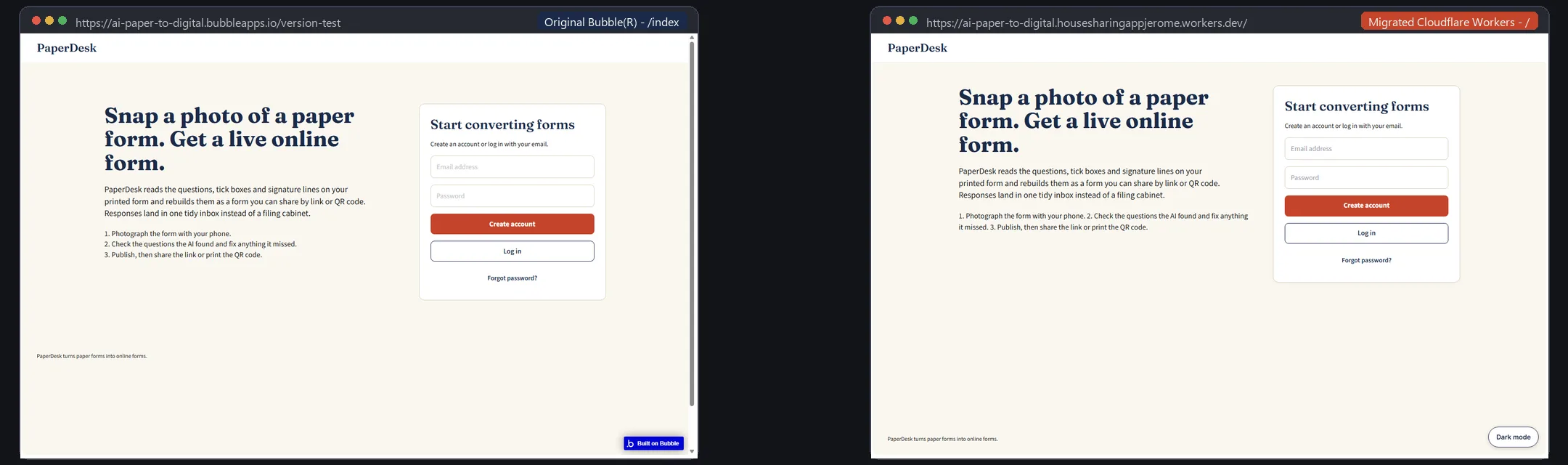
The data passes below move your records and files to a Cloudflare D1 database and an R2 bucket you own, without rebuilding your pages. The matching pass is already included in every full move price above.
You get every data type, its fields and relations, record counts, what the Data API does not expose, the risks, the workload the export would put on your plan, and the D1 tables it would create. Nothing is written anywhere.
nc_auditReads every data type, field and relation, the record counts, what the Data API does not expose, the risks, the workload an export would put on your plan and the D1 tables it would create.
nc_planTurns the audit into an ordered plan for your app, with the pass it needs and its price. Nothing is written anywhere.
nc_connectGives you a one-time link to a secure page where you type your tokens and upload your app's data catalog. They never pass through the chat.
nc_schemaCreates the D1 schema as SQL migration files and a Drizzle schema.
nc_exportExports the records to your R2 bucket, resumable, in batches that respect your plan.
nc_loadLoads them into D1. Run it again and zero rows change.
nc_filesCopies every file and image to R2 by content hash and links them.
nc_usersImports users and prepares the sign-in emails. It does not send them.
nc_accessTurns your privacy rules into an access policy with tests, and lists every rule it cannot translate with certainty.
nc_verifyChecks row counts against your live app, a checksum sample, broken references and missing files.
nc_redirectsBuilds the old-to-new redirect map and a script that tests every URL.
nc_cutoverPlans the cutover and the rollback. It never changes your DNS or your app.
| Option | Covers | Price |
|---|---|---|
| Audit and plan | The free tools, 3 runs per app per day | Free |
| Free trial | Every paid stage on up to 1,000 records and 250 MB of files, once per app, 7 days, no key | Free |
| Starter data pass | One app, up to 10,000 records and 1 GB of files, every paid tool, re-run as often as you like for 30 days | $39 USD |
| Migration data pass | One app, up to 100,000 records and 5 GB of files, every paid tool, re-run as often as you like for 30 days | $69 USD |
| Large data pass | One app, up to 500,000 records and 50 GB of files, every paid tool, re-run as often as you like for 30 days | $199 USD |
| Pages as well | The passes move records and files only. To rebuild the pages too, see the price ladder: App Mover, done for you or a custom rebuild. | See the ladder |
If an app turns out bigger than its pass, the run stops with everything kept and you move up to the next pass for the difference only. You buy credits, then the first paid stage on an app shows you an estimate (records, files, the workload on your plan and the price), checks that your tokens work, and waits for your go-ahead before it charges the pass. A wrong token stops it with nothing charged. Later stages on the same app are covered by the pass and do not ask again. Credits run out cleanly: the run stops where it is, nothing is lost, and it carries on after a top-up.
The same App Mover runs inside Claude Code, Claude Desktop, Cursor, Windsurf, Cline, Codex and Google Antigravity through its MCP server. You do not need this to use the studio on this page.
Step by step, with the sentence to paste, what you still do yourself and how to update a live app: move your Bubble app with your AI assistant (and its Update my app note).
Claude Code, free audit, plan and preview, no key:
claude mcp add --transport http nc-migrator https://nc.redcenterstudio.com/mcpAny tool that can reach a remote MCP server over Streamable HTTP can run App Mover. Start from this block. Leave out the headers lines for the free audit, plan and preview, which need no key; add them only if you hold a license key.
{
  "mcpServers": {
    "nc-migrator": {
      "url": "https://nc.redcenterstudio.com/mcp",
      "headers": {
        "Authorization": "Bearer <your license key>"
      }
    }
  }
}| Tool | Where it goes | What differs |
|---|---|---|
| Claude Desktop | Settings, then Connectors, then Add custom connector, and paste the URL. This is enough for the free steps. | The connector form has no header field. To use a license key, run the bridge instead: in claude_desktop_config.json add a server with command npx and args mcp-remote, the URL, --header and Authorization:Bearer followed by your key (needs Node.js). |
| Cursor | ~/.cursor/mcp.json for every project, or .cursor/mcp.json inside one project. | Use the block as it is. |
| Windsurf | Cascade, then the MCP panel, then Open MCP config file (usually ~/.codeium/windsurf/mcp_config.json). | Name the address serverUrl instead of url, then refresh the MCP panel. |
| Cline | The Cline panel, then MCP Servers, then Configure, then Configure MCP Servers (cline_mcp_settings.json). | Add "type": "streamableHttp" to the server, or Cline assumes the older SSE type. |
| Codex | ~/.codex/config.toml, or run codex mcp add nc-migrator --url with the address. | TOML, not JSON: a [mcp_servers.nc-migrator] table with url, and bearer_token_env_var set to the name of an environment variable that holds your key. |
| Google Antigravity | ~/.gemini/config/mcp_config.json, or .agents/mcp_config.json inside one workspace. | Name the address serverUrl instead of url. |
A license key is optional. If you hold one with a prepaid balance, add it as a header and the same price is taken from that balance instead of a card:
claude mcp add --transport http nc-migrator https://nc.redcenterstudio.com/mcp --header "Authorization: Bearer <your key>"Your tokens never go in the chat. For a full move, nothing is asked before you pay. For a data-only move, when the migrator needs your Cloudflare token, R2 keys or the app's Data API token, ask your agent to use nc_connect. It gives you a link to a page on the migrator, valid for 30 minutes and for one use. Type the tokens there. Each token is checked with its service before it is saved, then sealed in your job. Do not paste tokens into your agent.
Credits are optional. A move run by an AI agent is paid by one card checkout, like the studio, so you do not need credits for it. Credits come out of your license key for the data passes, or if you prefer a prepaid balance. One credit is one US dollar. A pack adds credit in one payment: $25 USD adds $25 USD, $100 USD adds $110 USD (10% bonus), $300 USD adds $360 USD (20% bonus). Credits are not cash and are not paid out. Payments are taken by Stripe. You do not need credits for the studio on this page.
In your Bubble editor, open Settings, then the General tab, and click Export application. The free preview needs no account and no card.
Only your Cloudflare account token (the free plan is enough to build and preview) is required; it is asked for on a secure page right after you pay so we can create your database and deploy your app. It takes about 3 minutes and never stops your build from starting. A Bubble Data API key is optional (only if you want existing Bubble records moved; your app structure, pages, privacy rules, and option sets move without it, and you can add it later). Service keys (Stripe, SMS, sign-in) and R2 keys are also optional and addable later. An email key is optional too: when your domain is in your Cloudflare account, sign-in emails go out through Cloudflare with no key. The studio shows where to find each one, under "After you pay: what you will need".
| What | How long we keep it |
|---|---|
| Your free preview and the app file you uploaded | 7 days from your last visit (the file never more than 30 days after upload) |
| A paid move | 30 days from your last visit, and 30 days after you go live |
| Your Cloudflare token (and optional Bubble Data API key if added) | Deleted when you go live |
| Passwords and keys inside your app file | Removed as the file arrives, never saved |