Enquiries arrive everywhere
Calls, texts, emails, social messages and web forms. Details and photos end up spread across phones and inboxes, and some never get a reply.
One link for enquiries and photos, a reply in seconds, quotes your customers accept on their phone, and reminders that follow up for you. Runs in your own Cloudflare account, for $99 USD once.
Thank you for buying CatchDesk. Check your email for your licence and setup guide, and GitHub for your invitation to the code. It can take a few minutes. Nothing arrived after an hour? Email Hello@redcenterstudio.com.
In short: CatchDesk is a leads and quoting app for service businesses, by Red Center Studio. Customers send an enquiry with photos from one link and get an automatic reply in seconds. Your team sees every enquiry in one inbox, urgent jobs first, and sends a quote the customer accepts on their phone, choosing between options, extras and quantities, with a deposit and an optional signature. Reminders follow up unanswered quotes by email or text, and customers can pick a visit time. It runs in your own Cloudflare account for $99 USD once, with no monthly fee.
Calls, texts, emails, social messages and web forms. Details and photos end up spread across phones and inboxes, and some never get a reply.
Writing each quote from scratch eats evenings. The longer a customer waits, the more likely they book whoever answered first.
A quote that goes quiet is easy to forget when you are busy on the tools, so good jobs slip away without a second message.
From one link on your website, social pages or a QR code: the service, a few questions about it, a description, up to six photos, how urgent it is and times that suit. They see a typical starting price, and get an automatic reply in seconds.
Draft the quote from your own prices with one click, then adjust it. Offer good, better and best options, optional extras and quantities the customer can change. Send it by email, or by text if they agreed.
The customer picks an option, ticks extras, sees the total change and accepts with their name or a signature. You offer a few visit times and they pick one. No answer? Reminders follow up for you.
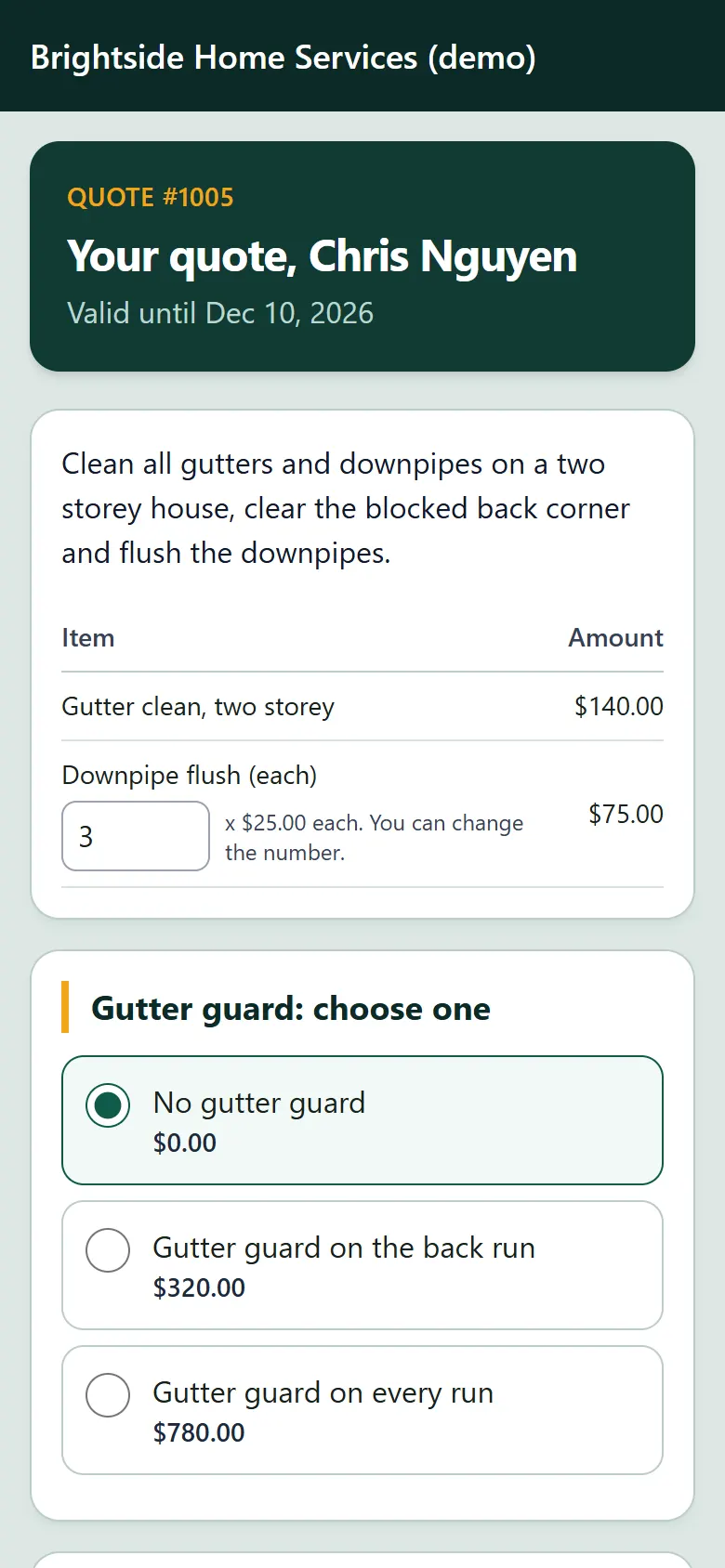
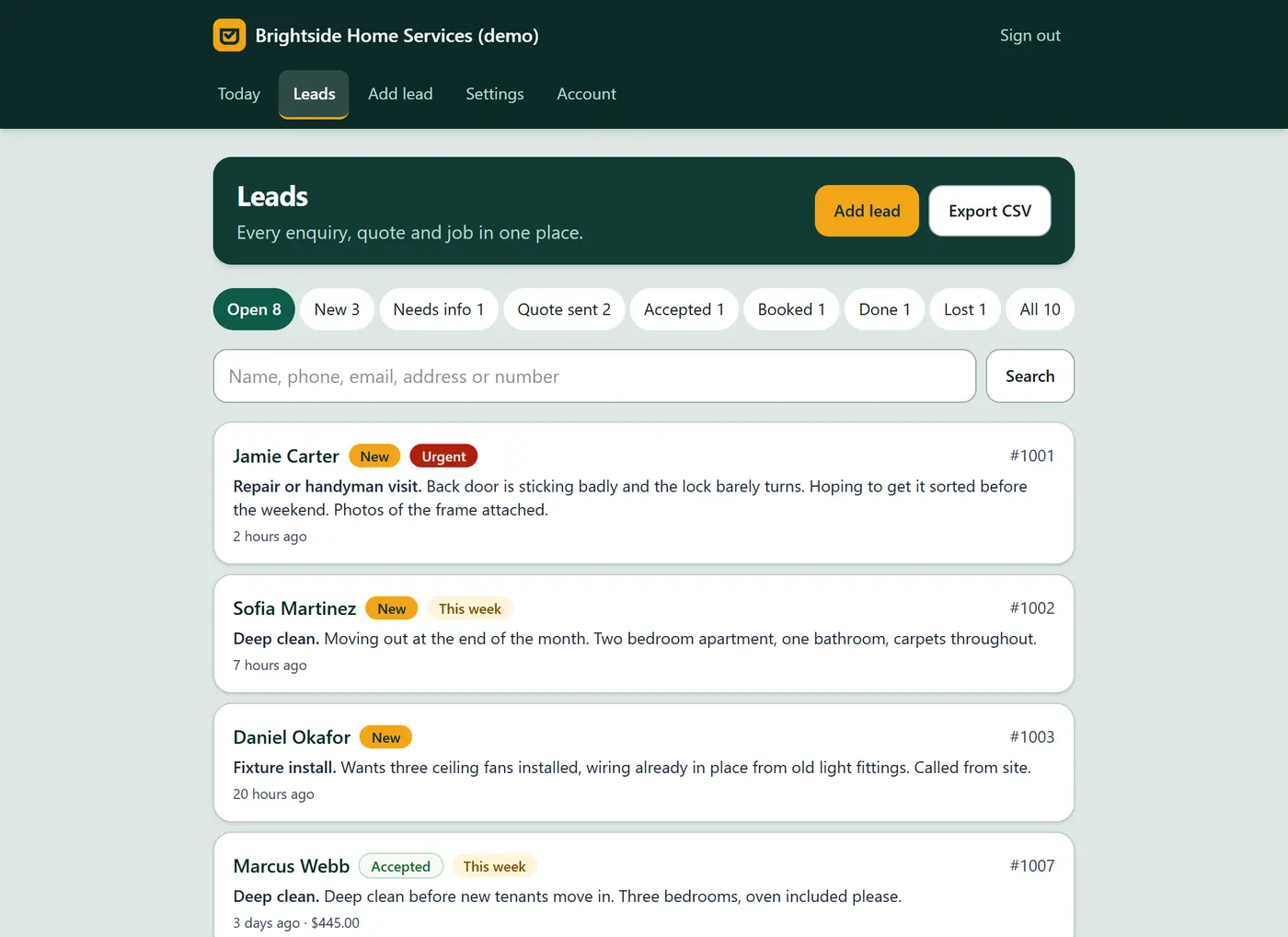
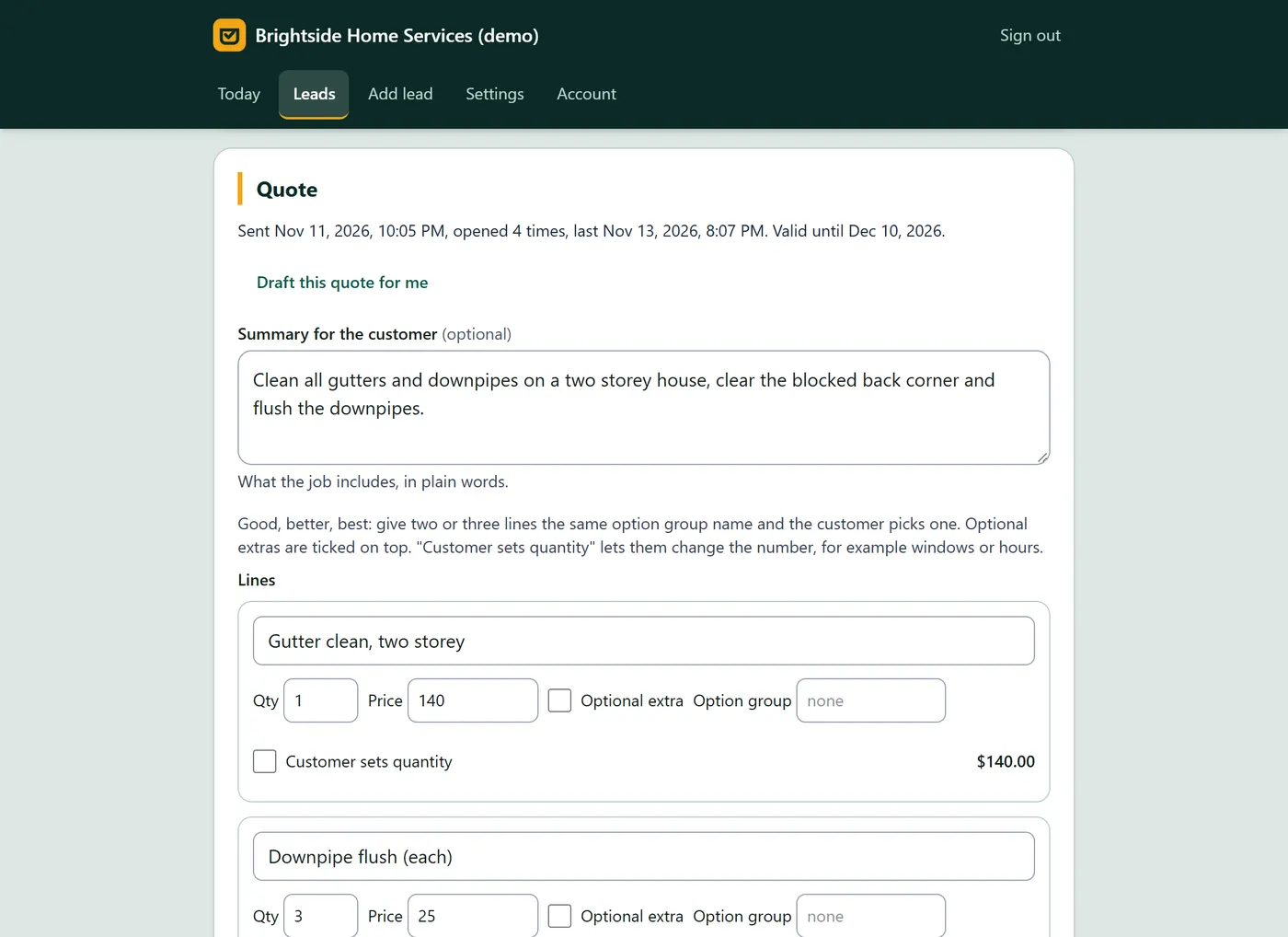
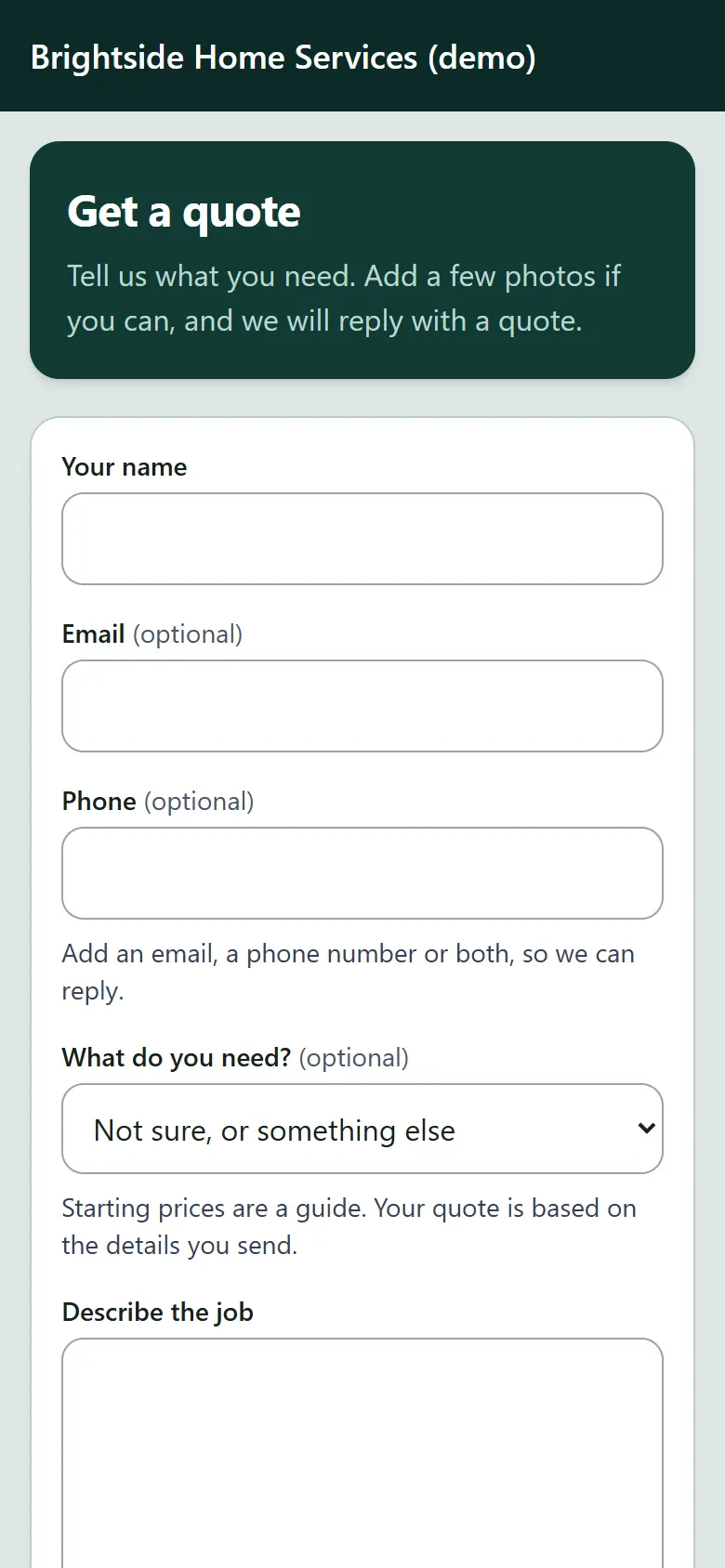
The demo runs CatchDesk for a sample home services business with real enquiries and quotes. Send an enquiry from the form, open a customer quote and choose an option, then sign in with one click to draft and send a quote, offer visit times and see the Today board. No emails or texts are sent, and it resets every night, so change anything you like.
An enquiry form with photos, a leads inbox and pipeline, quotes customers accept on their phone, bookings, notes and team roles. Open source under the MIT licence.
Download free on GitHub$99 USD once for one business, no monthly fee.
Everything in Lite, plus: Good, better and best options with extras, deposits, signatures, customers picking a visit time, automatic reminders and replies, AI quote drafts, quote-opened tracking, staff assignment, source reports, CSV export and text messages.
What you get:
CatchDesk installed in your own Cloudflare account, with your business details, services, prices, email and domain set up and your enquiry form ready to share. Turnaround is within 1 to 5 days, depending on complexity and workload.
$499 USD, paid once.
Book the Turnkey SetupJob and quoting apps usually charge per user, every month, and keep features such as quote follow-ups, options and extras for their higher plans. CatchDesk is $99 USD once, with everything included.
| CatchDesk | Typical subscription app | |
|---|---|---|
| Price | $99 USD once | Usually per user, every month |
| Enquiry form with photos | Yes | Usually, sometimes an add-on |
| Automatic reply to new enquiries | Yes, your words or AI | Varies |
| Good, better, best options on quotes | Yes | Often only on higher plans |
| Optional extras and customer quantities | Yes | Often only on higher plans |
| Automatic quote follow-ups | Yes | Often only on higher plans |
| Customer picks a visit time | Yes | Varies |
| Users, leads and quotes | Unlimited | Often limited by plan |
| Where your data lives | Your Cloudflare account | The vendor's servers |
| You own the code | Yes, for your business | No |
| Invoicing and card payments | No, it covers enquiry to booking | Usually |
A leads and quoting app for service businesses. It gives you one enquiry form with photos, an automatic first reply, an inbox for every enquiry, quotes your customers accept online, reminders that follow up for you, and visit times customers pick themselves. It suits trades, cleaners, handymen, landscapers, pool and pest services, studios and any business that quotes before it works.
$99 USD once for one business, with no monthly fee and no limit on users, leads or quotes. You run it in your own Cloudflare account; a small business usually fits in Cloudflare's free plan. Texts are optional and billed by your text provider per message. If you would rather not set it up yourself, the Turnkey Setup is $499 USD.
Yes. The live demo runs CatchDesk for a sample home services business. Send an enquiry, open a customer quote, pick an option and change a quantity, then sign in with one click as the owner or staff to draft and send quotes. It resets every night and never sends email or texts.
Not many. The setup guide walks you through it step by step in plain language and takes about 30 minutes the first time: install Node.js, set one secret, and run two commands. If you would rather not, choose the Turnkey Setup and it is installed in your Cloudflare account with your services, prices, email and domain.
They get a private link by email, or by text if they agreed. The quote page shows your summary and lines, any options to choose between, extras to tick and quantities they can change, then tax, the deposit and how to pay it. The total updates as they choose, and is worked out again on the server when they accept with their name or a signature.
Only if you switch it on, and never for prices. The Draft this quote for me button fills a quote from your own call-out fee, hourly rate, minimum job and service prices. With Cloudflare Workers AI switched on in your account, it can also estimate hours, write the quote summary, and write the automatic first reply to new enquiries. Any AI reply that mentions a price or a link is replaced with your own words, and a person checks every quote before it is sent.
It can. Add a Twilio number and two keys, and customers who tick "You can text me" on the enquiry form get the automatic reply, their quote link, booking confirmations and reminders by text. The form includes the consent wording texting rules expect, every text says how to opt out, and STOP replies are honoured. Without a text provider, everything works by email.
In your own Cloudflare account: the database, the photos and the signatures. Photos and signatures are private files, and quote links are long random addresses that cannot be guessed. You own your data and your copy of the code, and you can export every lead as a spreadsheet at any time.
No. CatchDesk covers enquiry to booking. You choose how the deposit is paid, for example a payment link or bank details, and it is shown on the quote page and in the acceptance email. Staff mark the deposit paid when it arrives.
Yes. You get the full source code. Wording, colours, emails, form questions and permissions each live in one place, and the customising guide says where. The code is TypeScript on Cloudflare Workers, with 85 automated tests and browser tests to check your changes.
Setup questions are answered by email at Hello@redcenterstudio.com. Updates are published to the repository. Your rights under the Australian Consumer Law apply in full, as set out in our terms.
Yes. CatchDesk is built to WCAG 2.2 AA. Every page passes automated accessibility checks at desktop and phone width, with labelled fields, visible focus, skip links and totals announced to screen readers. Customers who cannot draw a signature can use their typed name instead.